


Features
- Get a fast overview of data exchanged via ReqIF with links to directly access the configuration.
- Automatically import ReqIF documents that are uploaded to a local folder on the server.
- Automatically export LiveDocuments that are modified and configured for export to a local folder on the server.
Installation
- Extract to <Polarion>/polarion/extensions and restart Polarion.
Configuration
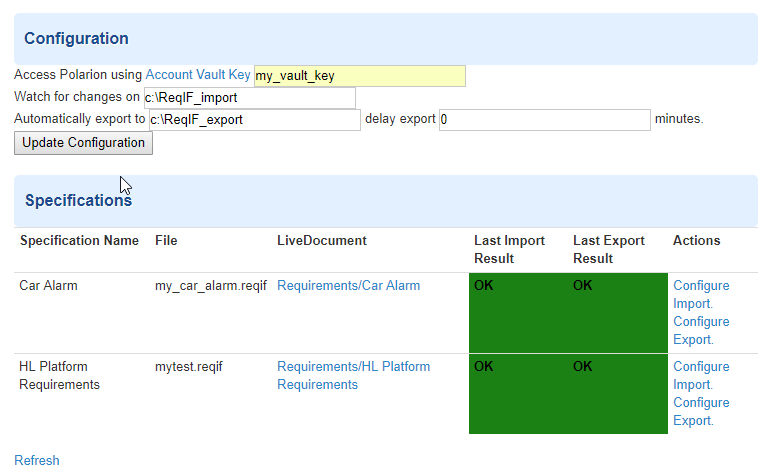
Open the "Automated ReqIF Exchange" configuration page in Polarion Administration and specify configuration parameters as follows:
- Account Vault Key: Use a vault key parameter previously configured in the Account value key admin settings. Please see the online help for more information.
- NOTE: Only "technical users" should be used for creating the user account vault key
- Watch for changes on: This is a directory/folder location on your Polarion server. The plugin monitors this folder for ReqIF files to import.
- Automatically export to: This is a directory/folder location on your Polarion server. The plugin uses this folder for export. You can additionally specify a delay to export, in minutes. If you specify 0 minutes, the moment a user saves the live document, the plugin will automatically create the ReqIF file in the specified folder. If you specify 5 minutes, then after saving the document, the plugin will wait 5 minutes before an export. This is helpful if the plugin is being set up and many changes are being made to the live document.
To avoid conflict, please use a different folder location for import and export.
In the specification area below, you will see the status (needs configuration, successful export/import, unsuccessful export/import) of live docs/specifications that are suitable for Automated ReqIF export/import. For a specification to be automatically exported or imported, a manual export/import should be done first. Once a manual configuration has been set up that specifies mapping rules, the plugin will then use those settings for automatic import/export.
The plugin provides easy-to-use hyperlinks to view the log file of any import/export.
Troubleshooting
- Delete folder ".config" in C:\Polarion\polarion\data\workspace (or /opt/polarion/data/workspace on Linux) and restart Polarion.